SaaS · Work Order Tracking

Every job, every step, every worker. On one board.

JobAssign moves each work order through your process steps, shows every worker exactly what is theirs, and has AI check each job for mistakes before it reaches the floor — for manufacturing, auto repair, construction, trades, healthcare and more.

30 days free 15 people 40 AI checks No credit card
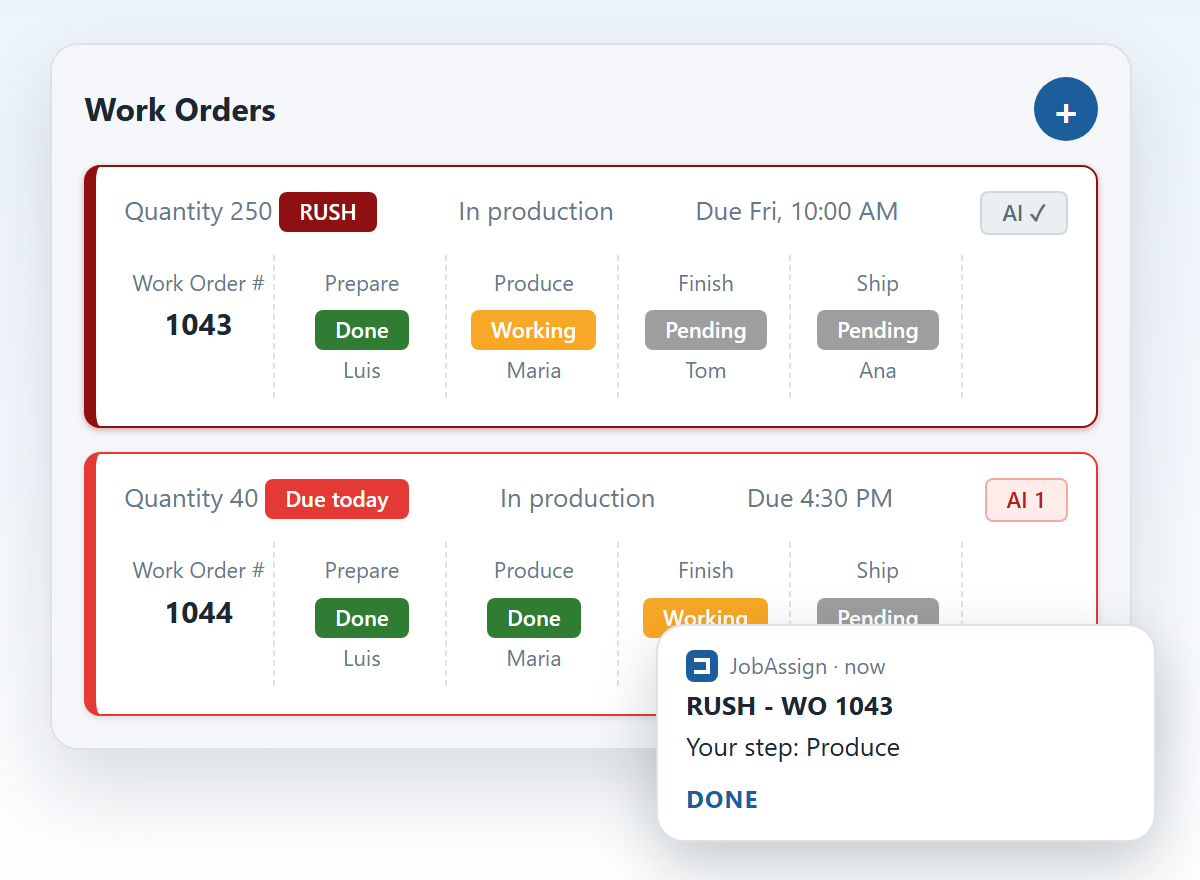
JobAssign work order board showing jobs moving through Prepare, Produce, Finish and Ship with a worker on each step, and a worker's phone notification with a Done button

Know where every job is without walking the floor

One board for the office, and a short list for each person on the floor: just the jobs that need them next.

📋

Your process, step by step

Set the steps your shop really follows. Each job moves through them in order, with one person on each step.

👤

Everyone sees their own work

Workers sign in with a username, no email needed, and see only the jobs with a step for them. One tap on Done and the next person is up.

🔔

Phones buzz at the right moment

A worker hears about a job when it is assigned to them, when it is almost due and when it changes — and can mark their step done right from the notification.

🚨

Urgent jobs stand out

Rush, late, due today, due tomorrow: every job is coloured from its dates, and rush jobs go to the top of the board.

📊

Workload and statistics

See how much open work each person is carrying right now, and how many jobs were rush or late over the last 7 days, 30 days and this month.

🏭

Made for your trade

Pick your industry and every job uses your words — Work Order #, Repair Order, Service Call # — with suggested process steps to start from.

Catch the mistake before it reaches the floor

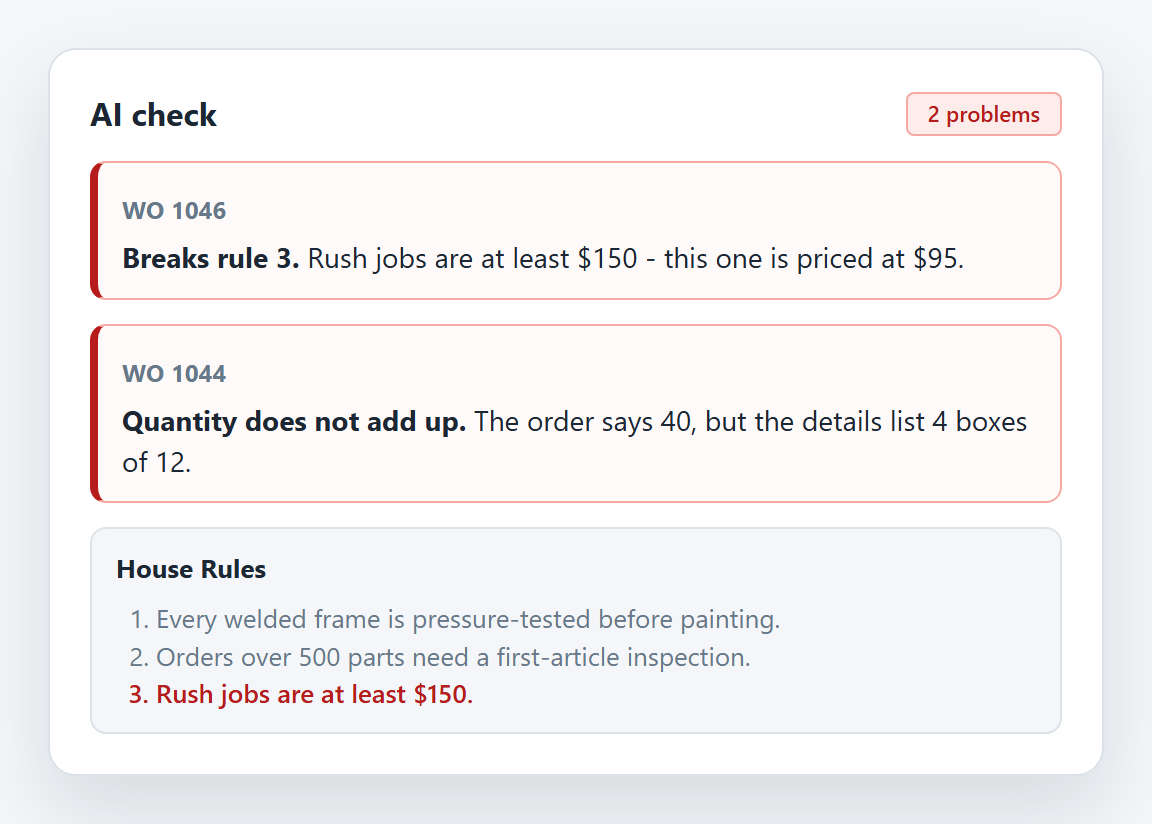
A wrong quantity or a missing step costs the most once the job is being made. The AI check reads each work order and flags what does not add up — like an order that says 40 when the details list 4 boxes of 12.

  • Runs by itself. Once you switch it on, every new job is checked as soon as it is saved, drafts included, so a job is reviewed before you press Ready.
  • Learns your shop with House Rules. Write facts in your own words. Any job that breaks one is flagged, with the rule quoted — and the check stops warning about things your rules allow.
  • Right on the board. A reviewed job carries an AI tag. Click it to read what was found and fix the job.
  • Never guesses prices. It checks prices only against the price rules you write.
  • Simple to count. Every work order is checked once, so your allowance is just how many work orders a month.

Example House Rules

  1. Every welded frame is pressure-tested before painting.
  2. Orders over 500 parts need a first-article inspection.
  3. Rush jobs are at least $150.
JobAssign AI check panel flagging a job that breaks a house rule and a job whose quantity does not add up

The AI check flagging a rush job priced below a House Rule, and a quantity that does not match its details.

Everything else you need to run the board

The details that make it work day to day, for the office and for the floor.

📝

Drafts or straight to production

Create a work order with quantity, due date and time, optional price, a rush flag and up to 5,000 characters of details. Pick a worker for each step, then send it to production or save it as a draft.

⏰

Almost-due reminders

Push a reminder to every worker with an unfinished step when a job gets close to its due date — anywhere from 5 minutes to 7 days before.

💲

Prices stay private

Administrators always see prices. Workers only see them if you switch that on, so what a job is charged stays between you and the customer.

🔍

Search and history

Search the board for any work order, and open the History to look back at past jobs whenever you need to check what was done.

🏢

Many companies, one plan

A single plan covers up to 80 companies or branches, each with its own board, process steps and people.

🔒

Secure accounts

Strong passwords, two-step verification, temporary passwords that workers change on first login, and removed staff kept on record so their name stays on the jobs they did.
Works the way your industry talks

Pick yours during setup and JobAssign uses your words on every job — Work Order #, Repair Order, Service Call # — and suggests process steps you can keep or rewrite.

🏭 Manufacturing 🚗 Auto repair 🏗️ Construction 🔧 Plumbing & HVAC 🏥 Healthcare ⚙️ Machine service

Three steps to your first job

Set it up today and see your whole shop on one board.

1

Create your account

An email and a password. Then name your company and its administrator, and your free trial starts.

2

Set up your board

Pick your industry, take the suggested steps or write your own, and add your people. They get a username and password, no email needed.

3

Send jobs to production

Each worker is notified about their step. As they tap Done, the job moves along the board for everyone to see.

Try everything free. Then pay for what you use.

Your plan
From $19 a month
Canadian dollars
  • Choose how many people use it, up to 200
  • Choose your AI checks a month, up to 2,500
  • One plan covers up to 80 companies or branches
  • Pay yearly and get two months free
Start with the free trial →

More than 200 people or 2,500 AI checks a month? Call 416-726-0586.
Prices in Canadian dollars, plus applicable tax. Nothing is charged during the free trial, and when it ends your data stays until you choose a plan. Plans renew automatically until you cancel, and you can cancel anytime; you keep your plan to the end of the period paid. See the Terms for billing, cancellation and refunds.

Common questions

Do my workers need an email address?

No. The administrator adds each worker with a username and a temporary password. Workers choose their own password the first time they sign in.

What devices does it run on?

JobAssign runs in the web browser on computers, tablets and phones. On a computer the board and the AI problems sit side by side, and workers can turn on push notifications to hear about their jobs and mark steps done from their phone.

How are AI checks counted?

Every work order is checked once, so your allowance is simply how many work orders you produce a month. Automatic checking stops when the daily or monthly allowance runs out, and paid plans let you choose up to 2,500 AI checks a month.

What happens when the free trial ends?

Nothing is charged during the trial. When it ends, your data stays until you choose a plan.

Can I cancel anytime?

Yes. Plans renew automatically until you cancel, and you keep your plan to the end of the period you paid for. Payments are not refunded for partial periods.

Can I run more than one company or branch?

Yes. One plan covers up to 80 companies or branches, each with its own board, steps and people.

See your whole shop on one board

Set it up today and try JobAssign free for 30 days — 15 people, 40 AI checks, no credit card.

Visit jobassignapp.com · support@jobassignapp.com · 416-726-0586